Be yourself; Everyone else is already taken.
— Oscar Wilde.
This is the first post on my new blog. I’m just getting this new blog going, so stay tuned for more. Subscribe below to get notified when I post new updates.
Be yourself; Everyone else is already taken.
— Oscar Wilde.
This is the first post on my new blog. I’m just getting this new blog going, so stay tuned for more. Subscribe below to get notified when I post new updates.
Real Cricket 19 offers the best, complete and outstanding Cricket gaming experience on Android devices. This Cricket Game is touted as the best and the most complete cricketing game ever to hit the Android Platform. This game has an average review of around 4.5 from over half a million reviewers which shows the popularity of this game.

The developers of this app Nautilus Mobile Sport have been constantly enhancing and improving the gameplay with regular updates. Nautilus seems to have tried to make Real Cricket 19 look and feel a lot like a live TV broadcast of a cricket match. Each game begins with an aerial shot of the city as the camera literally flies into the stadium. Everything from the toss to the action replays looks a lot more like TV broadcasts, and there’s even a pre- and mid-game show where so-called experts offer their thoughts on the game.
Visuals and graphics compared to other cricket games are better but still on the average side. Certain elements like the people in the stadium look like cardboard cut-outs. But we can’t see why the developer would add a pre-match show where the presenters make some rather generic comments. The show doesn’t add anything to Real Cricket 19 as the experts’ comments don’t mention player names.
The Gameplay
Usually, nobody likes bowling in mobile cricket games, but Real Cricket 19 makes it a little less tedious thanks to its technology. There are a wide variety of bowlers whose actions are well rendered even if each type of bowler only has one generic action. The game has many different types of deliveries. Such as, off-cutter, drifter, and flipper, and the animations for each of these is quite realistic. This will keep you interested in the bowling format of the game as well.
Not only this you can also customize the field and bowl accordingly. Taking wickets is not easy but it is possible to cut down the flow of runs and force batsmen into making mistakes.
All in all the gameplay makes it stand out from the other Cricket games. We give 10 out of 10 points to this game.
WhatsApp, Telegram, Allo, LINE… Although the former is the absolute king of instant messaging there’s an increasing amount of options to choose from to talk to our contacts by instant messaging. imo for pc could seem like just another one in the queue, but it’s really much more than that.
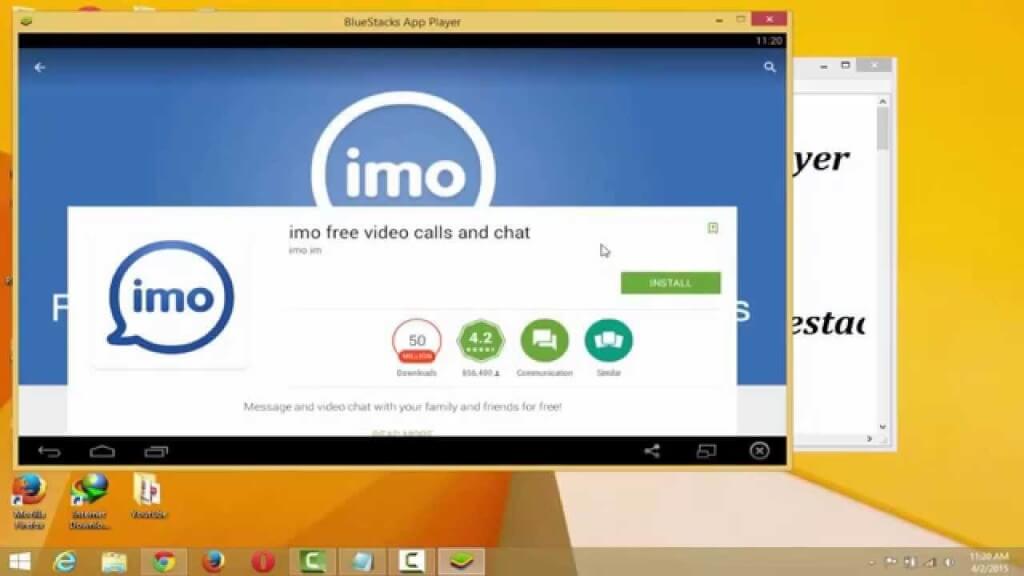
It’s an instant messaging service that uses the VoIP protocol for communication, as is the case of Microsoft’s Skype but, unlike the latter, it doesn’t include any geographical restrictions, it’s totally free and it requires a minimum bandwidth to work correctly. In countries like Cuba, in which access to the Internet is limited and there are plenty of restrictions on behalf of providers, this is the most popular instant messaging app.
The most used messaging application in Cuba.
This service, like WhatsApp and other messaging applications, started off as a mobile app for smartphones and tablets but its users started demanding a PC version to gain in comfort. When you’re working in your office or browsing at home it’s much more comfortable to use these tools straight from your PC to chat with your contacts on a larger screen and using a physical keyboard.
Using this client is very easy, you only have to follow some simple steps to start chatting, calling or holding video conferences from your PC as if it were a smartphone:
After correctly synchronizing the mobile application with the desktop client, you can start chatting or talking via VoIP with all your contacts on this service, totally for free, without using up all your bandwidth and very easily.Requirements and additional information:
This is an example post, originally published as part of Blogging University. Enroll in one of our ten programs, and start your blog right.
You’re going to publish a post today. Don’t worry about how your blog looks. Don’t worry if you haven’t given it a name yet, or you’re feeling overwhelmed. Just click the “New Post” button, and tell us why you’re here.
Why do this?
The post can be short or long, a personal intro to your life or a bloggy mission statement, a manifesto for the future or a simple outline of your the types of things you hope to publish.
To help you get started, here are a few questions:
You’re not locked into any of this; one of the wonderful things about blogs is how they constantly evolve as we learn, grow, and interact with one another — but it’s good to know where and why you started, and articulating your goals may just give you a few other post ideas.
Can’t think how to get started? Just write the first thing that pops into your head. Anne Lamott, author of a book on writing we love, says that you need to give yourself permission to write a “crappy first draft”. Anne makes a great point — just start writing, and worry about editing it later.
When you’re ready to publish, give your post three to five tags that describe your blog’s focus — writing, photography, fiction, parenting, food, cars, movies, sports, whatever. These tags will help others who care about your topics find you in the Reader. Make sure one of the tags is “zerotohero,” so other new bloggers can find you, too.

 imoforpcw